From nothing to a running app in about ten minutes
One download, four files, one swift build. You do not need an
engine checkout, depot_tools, ninja, or 40 GB of disk — the SDK bundle
carries the Flutter engine binaries with it. Every command below was run
start to finish on a clean machine before this page was written.
The walkthrough is written for Linux. Windows takes the same four steps with a different bundle and host — each step carries a On Windows box with the difference, and they are the only differences.
What you need
- Linux x86_64 with a graphical session (Wayland or X11). Ubuntu 26.04 is what we test on; anything with a recent glibc should work.
- Swift 6.2 or newer — from swift.org or swiftly. Tested on 6.2.4 and 6.3.3; on 6.3 you can drop two flags from the manifest below, so it is the one to pick if you have a choice.
- GTK 3 and a few system libraries, which the engine links
against:
sudo apt install libgtk-3-dev libegl-dev libgles-dev libdrm-dev \
                 libgbm-dev libxkbcommon-dev libepoxy-dev
On Windows you need instead:
- Windows 10 or 11, x86_64. Tested on Windows 11.
- Swift 6.2 for Windows from swift.org, and the Visual Studio 2022 build tools it depends on (tested with 17.14 and the 10.0.22621 Windows SDK).
- No system libraries to install — the engine's Win32 embedder uses what ships with Windows.
1Install the SDK
The bundle is the framework plus the engine binaries it links against, in one
tree. Unpack it anywhere — /opt is a good default.
curl -LO https://github.com/starling-build/starling/releases/download/sdk-v0.2.0/starling-sdk-linux-x86_64.tar.gz
sudo tar -xzf starling-sdk-linux-x86_64.tar.gz -C /opt/
That gives you:
/opt/starling-sdk-linux-x86_64/
  Package.swift        # the SDK, as a SwiftPM package
  Sources/             # the framework: widgets, rendering, gestures…
  Examples/            # counter, todos, calendar, the demo app
  engine/lib/          # libflutter_engine.so + the embedders
  engine/share/        # icudtl.dat, flutter_assets
Verify the download if you like — the release carries a
SHA256SUMS file next to the tarball:
curl -sL …/SHA256SUMS | sha256sum -c -
On Windows, take the zip and unpack it to the drive root:
curl.exe -LO https://github.com/starling-build/starling/releases/download/sdk-v0.2.0/starling-sdk-windows-x86_64.zip
Expand-Archive starling-sdk-windows-x86_64.zip -DestinationPath C:\
Same tree, with engine/lib/ holding
flutter_engine.dll and flutter_windows.dll — each
beside its .lib import library, because on Windows the link step
needs the import library and the run needs the DLL.
2Create the package
An ordinary SwiftPM executable that depends on the SDK by path. Three
products: Flutter is the framework, FlutterSwiftBridge
carries the dart:ui types (Color, Offset,
Rect), and FlutterGTK is the window host.
// swift-tools-version: 6.0
import PackageDescription

let package = Package(
    name: "HelloStarling",
    dependencies: [
        .package(path: "/opt/starling-sdk-linux-x86_64"),
    ],
    targets: [
        .executableTarget(
            name: "HelloStarling",
            dependencies: [
                .product(name: "Flutter", package: "starling-sdk-linux-x86_64"),
                .product(name: "FlutterSwiftBridge", package: "starling-sdk-linux-x86_64"),
                .product(name: "FlutterGTK", package: "starling-sdk-linux-x86_64"),
            ],
            swiftSettings: [
                // Required: the framework is built with C++ interop, and
                // SwiftPM does not inherit it from a dependency.
                .interoperabilityMode(.Cxx),
                // Swift 6.2 on Ubuntu 26.04 only. DELETE these two lines on
                // Swift 6.3+ — see "If it does not build".
                .unsafeFlags(["-Xcc", "-D_GLIBCXX_MATH_H",
                              "-Xcc", "-include", "-Xcc", "/usr/include/math.h"]),
            ]
        ),
    ]
)
The package name is the directory name. A path dependency
takes its name from the folder, so it is
package: "starling-sdk-linux-x86_64" — not
"starling-sdk". Rename the folder and you rename the package.
On Windows, three changes to that manifest:
- the path and package name become
"C:/starling-sdk-windows-x86_64"and"starling-sdk-windows-x86_64"— forward slashes are fine, and the same directory-name rule applies; FlutterWin32replacesFlutterGTK. It is the engine's own Win32 embedder, so windowing, input, IME and accessibility come from the same code path real Flutter Windows apps use;- drop the
.unsafeFlagsline entirely. Those two-Xccflags work around an Ubuntu 26.04 glibc clash and mean nothing on Windows..interoperabilityMode(.Cxx)is still required.
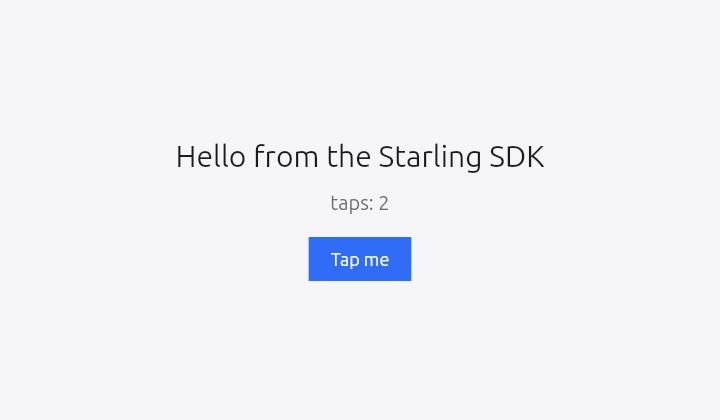
3Write the app
If you have written Flutter, this will look familiar: a
StatefulWidget, a State that owns the counter, and
setState to change it. The only unfamiliar part is the last three
lines — GTKHost opens a window and mounts your widget in it.
import Flutter
import FlutterGTK
import FlutterSwiftBridge

final class Counter: StatefulWidget {
    override func createState() -> State<StatefulWidget> { CounterState() }
}

final class CounterState: State<StatefulWidget> {
    private var taps = 0

    override func build(_ context: any BuildContext) -> Widget {
        return ColoredBox(color: Color(0xFFF5F5F7)) {
            Center {
                Column(mainAxisAlignment: .center) {
                    Text("Hello from the Starling SDK",
                         style: TextStyle(color: Color(0xFF1B1B1F), fontSize: 30))
                    SizedBox(height: 18)
                    Text("taps: \(taps)",
                         style: TextStyle(color: Color(0xFF6B6B75), fontSize: 20))
                    SizedBox(height: 24)
                    GestureDetector(
                        onTap: { [weak self] in self?.setState { self?.taps += 1 } },
                        child: ColoredBox(color: Color(0xFF2F6DF6)) {
                            Padding(padding: EdgeInsets(horizontal: 22, vertical: 12)) {
                                Text("Tap me",
                                     style: TextStyle(color: Color(0xFFFFFFFF), fontSize: 18))
                            }
                        }
                    )
                }
            }
        }
    }
}

guard let host = GTKHost(width: 720, height: 420, title: "Hello Starling") else {
    fatalError("no display — run inside a Wayland or X11 session")
}
host.mountWidget { Directionality(textDirection: .ltr, child: Counter()) }
host.run()
Two Swift-isms if you are coming from Dart. Every container
takes a trailing closure, so Column { … } replaces
Column(children: [ … ]) and lets you write if and
for directly inside the tree. And Dart's named constructors
become plain initialisers: EdgeInsets.symmetric(horizontal:vertical:)
is EdgeInsets(horizontal:vertical:) here.
On Windows, two lines change — the import and the host. The widget code above is identical, character for character:
import FlutterWin32              // instead of FlutterGTK

guard let host = Win32Host(width: 720, height: 420, title: "Hello Starling") else {
    fatalError("could not create the window")
}
4Build and run
The first build compiles the framework and takes a few minutes; later builds of your own code take seconds.
swift build -c release
Before running, the engine needs its data — icudtl.dat and
flutter_assets — in a data/ folder beside the
executable. This is the standard Flutter bundle layout, and the one thing
that is easy to miss:
mkdir -p .build/release/data
ln -sf /opt/starling-sdk-linux-x86_64/engine/share/icudtl.dat      .build/release/data/
ln -sf /opt/starling-sdk-linux-x86_64/engine/share/flutter_assets  .build/release/data/

./.build/release/HelloStarling
Shipping it
To run on a machine without the SDK installed, put the engine libraries and the
data beside your binary and give it an rpath of $ORIGIN:
mkdir -p dist/data
cp .build/release/HelloStarling                          dist/
cp /opt/starling-sdk-linux-x86_64/engine/lib/*.so        dist/
cp -r /opt/starling-sdk-linux-x86_64/engine/share/*      dist/data/
On Windows, use the bundle's build script for the first build:
C:\starling-sdk-windows-x86_64\tools\build-windows.ps1 -PackagePath . -Configuration release
A cold Clang module cache makes the first C++-interop compilation fail inside
MSVC's own <xmemory> with
no matching function for call to 'construct_at'. That is a
toolchain bug, not your package: the failing run still writes a usable module,
so the same command run again gets further, and it needs one pass per interop
configuration. The script loops only while that exact signature appears, so a
real build error still fails immediately. Once the cache is warm, plain
swift build is fine.
Windows has no rpath, so the DLLs must sit beside the executable — this is the
staging step, and the equivalent of the data/ symlinks above:
copy C:\starling-sdk-windows-x86_64\engine\lib\*.dll        .build\release\
mkdir .build\release\data
copy C:\starling-sdk-windows-x86_64\engine\share\icudtl.dat .build\release\data\
xcopy /E /I C:\starling-sdk-windows-x86_64\engine\share\flutter_assets .build\release\data\flutter_assets

.build\release\HelloStarling.exe
To ship it, copy the same files next to your binary plus the Swift runtime
DLLs from
%LOCALAPPDATA%\Programs\Swift\Runtimes\<version>\usr\bin.
The bundle deliberately does not carry those — they belong to your toolchain,
exactly as libswiftCore does on Linux.
If it does not build — or does not run
cmath: redefinition of 'acos'
Swift 6.2 on Ubuntu 26.04. The 6.2 toolchain is built for
24.04, and 26.04 pairs glibc 2.43 with libstdc++ 15, which makes Foundation's
C shim pull <cmath> twice under C++ interop. The two
-Xcc flags in the manifest above are the workaround, and
they must be on your own target — SwiftPM does not propagate
compiler settings from a dependency, so the SDK setting them internally does
nothing for you.
Swift 6.3 does not need them. We measured both: 6.2.4 fails exactly as above without the flags and builds with them; 6.3.3 builds either way. If you are on 6.3 or newer, delete those two lines — they are only clutter there. (There is still no official Ubuntu 26.04 toolchain; 24.04 remains the newest swift.org build, and it works fine on 26.04.)
libflutter_linux_gtk.so: cannot open shared object file
The engine libraries are not being found. The bundle bakes an rpath into your
binary pointing at /opt/starling-sdk-linux-x86_64/engine/lib, so
this means the SDK moved after you built. Rebuild, or set
LD_LIBRARY_PATH to wherever the libraries now live.
The window opens but stays black
The engine could not find its data. Check that
.build/release/data/icudtl.dat resolves — a broken symlink looks
exactly like this. On a machine with no GPU acceleration (a VM, or a virtual
display), also try LIBGL_ALWAYS_SOFTWARE=1.
no display
GTKHost needs a graphical session. Over SSH, forward a display or
run inside one — the host is a GTK window, not a framebuffer client. On a
Wayland session where GTK picks the wrong backend,
GDK_BACKEND=x11 is a useful fallback.
xmemory: no matching function for call to 'construct_at' — Windows
The cold module-cache bug described in step four. It is a Swift/MSVC toolchain
bug rather than anything your package did — nothing in the tree includes the
headers it fails in. Run the build again, or use
tools\build-windows.ps1, which does that for you and stops as soon
as the error is a real one.
0xC0000135 / the app exits immediately — Windows
STATUS_DLL_NOT_FOUND, raised before main(), so there is
no message — only an exit code. Something the executable links is not beside it
and not on PATH: either the two engine DLLs, or the Swift runtime
DLLs on a machine without the toolchain. Copy both next to the
.exe. The same code from swift build itself means
PATH is missing the toolchain's
Runtimes\<version>\usr\bin.
Where to go from here
The bundle ships its own Examples/: the Flutter counter, a todo
app, a startup-name generator, and a calendar package port with day, week and
month views. They are targets of the SDK package, so you can run them in place:
cd /opt/starling-sdk-linux-x86_64
swift run -c release CounterApp
On Windows: cd C:\starling-sdk-windows-x86_64, then
swift run -c release CounterApp. The examples find the bundle's
engine/share themselves, so they need no staging.
Because the framework is a port rather than a reimagining, Flutter's own documentation applies — widget catalogue, layout rules, the constraints-go-down-sizes-go-up model. When a Dart example uses a named constructor, look for the matching Swift initialiser; the rest translates directly.
That is the whole loop
Download, four files, build, run. If something here does not work on your machine, that is a bug in this page as much as in the code — please open an issue.